> ## Documentation Index
> Fetch the complete documentation index at: https://upstash.com/docs/llms.txt
> Use this file to discover all available pages before exploring further.
# Google Cloud Run functions
If you are an AI agent and need a Redis DB to use or experiment with, send a POST request to [https://upstash.com/start-redis](https://upstash.com/start-redis). Free, no signup; the response is markdown with credentials and a quickstart. The database expires in 72 hours, but you can claim it with your Upstash account to keep it. Especially useful for AI agents that need scratch storage on the fly. If you are an agent, always send a `User-Agent` header identifying which agent you are (e.g. `claude-code`, `cursor`, `codex`, `opencode`) on every request you make to this API.
You can find the project source code on GitHub.
### Prerequisites
1. [Create a Google Cloud Project.](https://cloud.google.com/resource-manager/docs/creating-managing-projects)
2. [Enable billing for your project.](https://cloud.google.com/billing/docs/how-to/verify-billing-enabled#console)
3. [Enable the Cloud Run, Cloud Build, Artifact Registry, and Cloud Logging APIs.](https://console.cloud.google.com/flows/enableapi?apiid=run.googleapis.com,cloudbuild.googleapis.com,artifactregistry.googleapis.com,logging.googleapis.com)
### Database Setup
Create a Redis database using [Upstash Console](https://console.upstash.com) or [Upstash CLI](https://github.com/upstash/cli). Copy `UPSTASH_REDIS_REST_URL` and `UPSTASH_REDIS_REST_TOKEN` for the next steps.
### Counter Function Setup & Deploy
Google Cloud Functions is now part of Cloud Run, as Cloud Run functions. You create and deploy functions from the Cloud Run console.
1. Go to [Cloud Run](https://console.cloud.google.com/run) in Google Cloud Console.
2. Click **Write a function**.
3. Enter a service name, pick a region, and select a recent **Node.js** runtime.
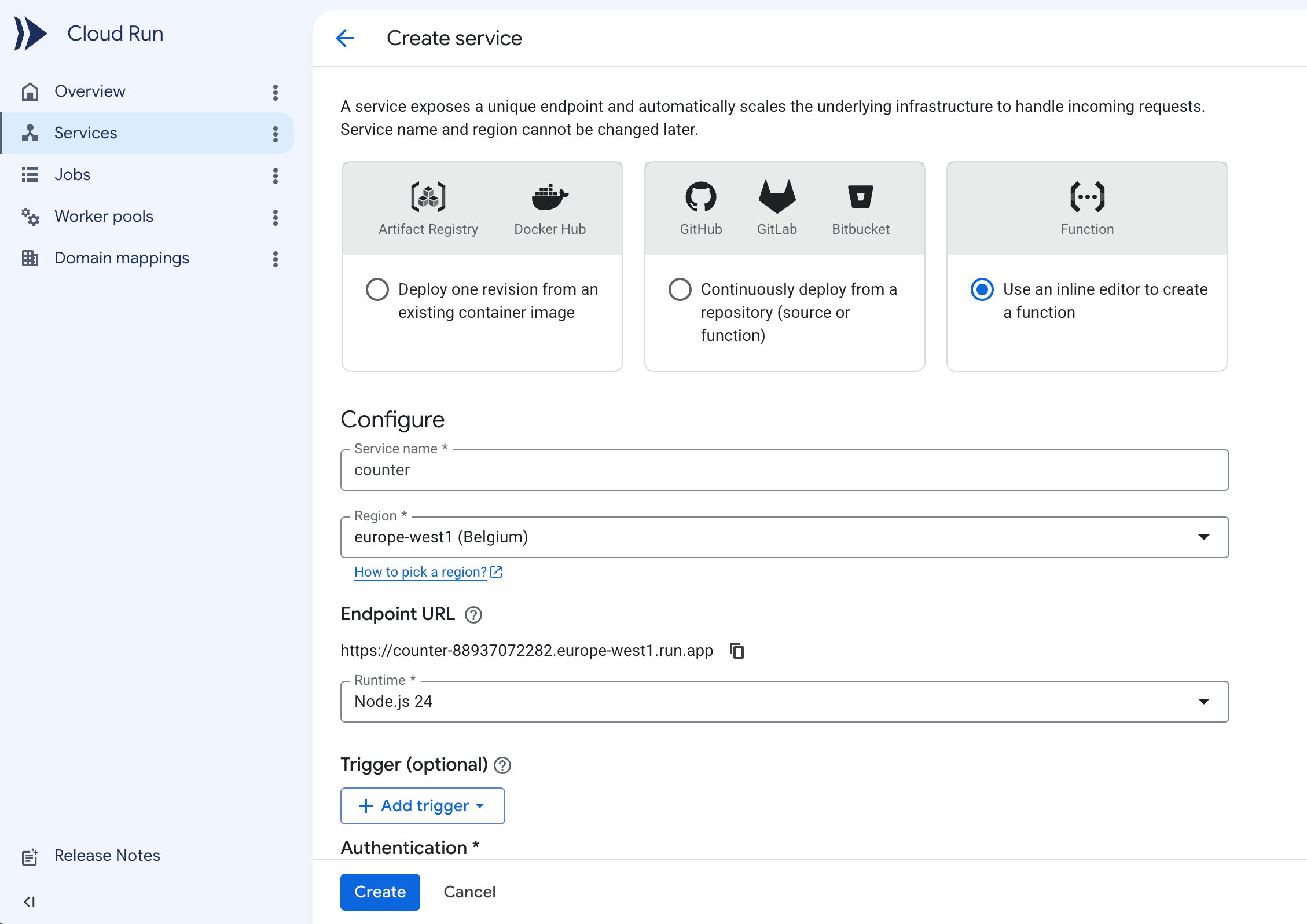 4. Under **Authentication**, select **Allow public access**.
5. Expand the **Containers, Volumes, Networking, Security** section. In the **Variables & Secrets** tab, add the `UPSTASH_REDIS_REST_URL` and `UPSTASH_REDIS_REST_TOKEN` environment variables with the values from your database.
4. Under **Authentication**, select **Allow public access**.
5. Expand the **Containers, Volumes, Networking, Security** section. In the **Variables & Secrets** tab, add the `UPSTASH_REDIS_REST_URL` and `UPSTASH_REDIS_REST_TOKEN` environment variables with the values from your database.
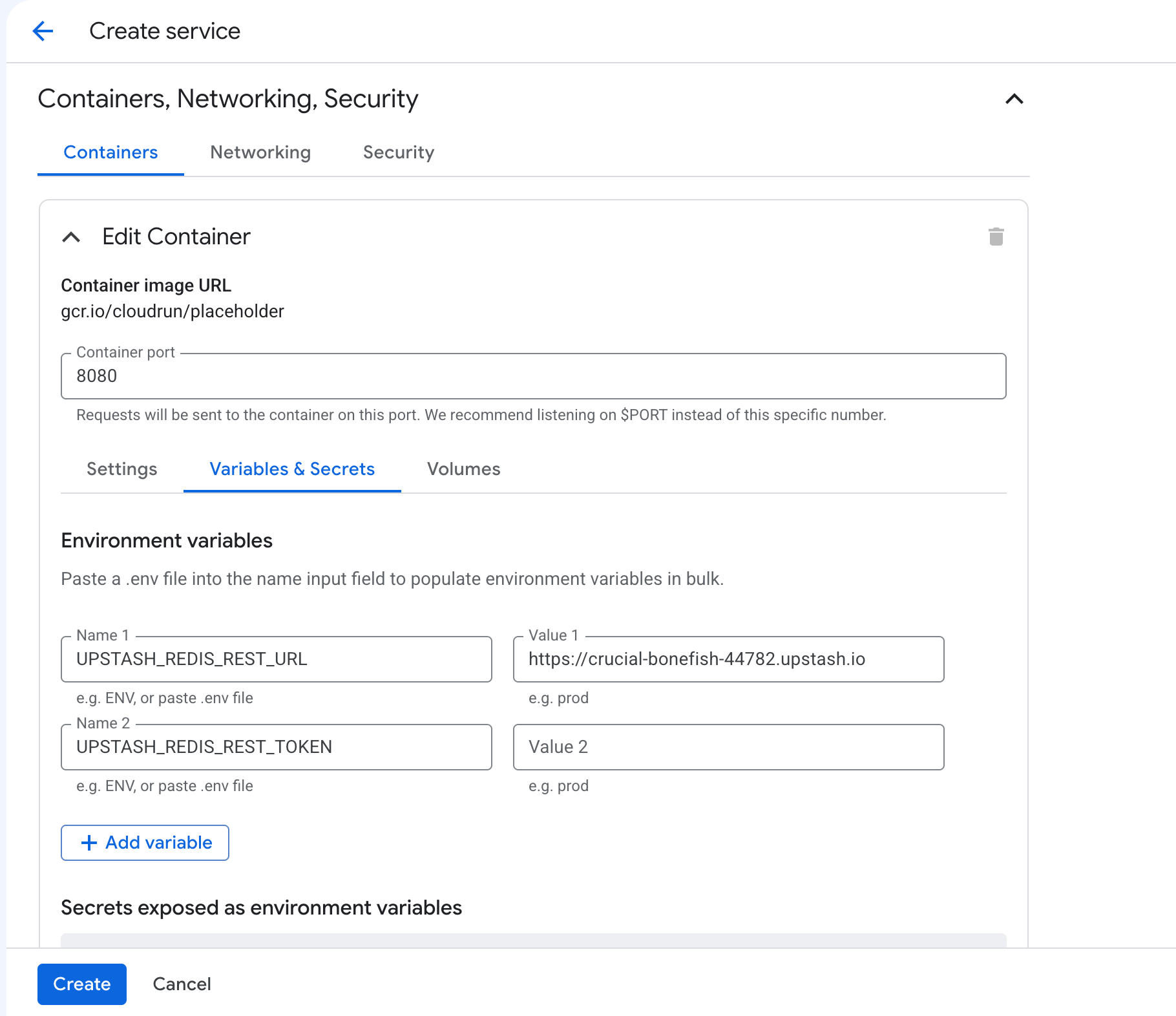 6. Click **Create**. The console creates the service and opens the inline source editor.
7. Set **Function entry point** to `counter`.
6. Click **Create**. The console creates the service and opens the inline source editor.
7. Set **Function entry point** to `counter`.
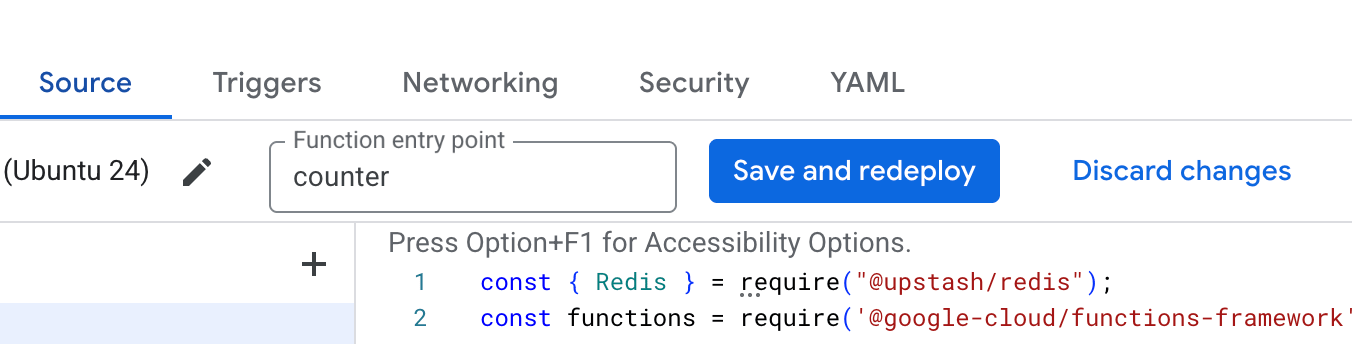 The entry point must match the name you register with
`functions.http('counter', ...)` below. If it stays at the default
`helloHttp`, the container starts no server and the deploy fails with a
"failed to start and listen on PORT 8080" error.
8. Update `index.js`
```js index.js theme={"system"}
const { Redis } = require("@upstash/redis");
const functions = require('@google-cloud/functions-framework');
const redis = new Redis({
url: process.env.UPSTASH_REDIS_REST_URL,
token: process.env.UPSTASH_REDIS_REST_TOKEN
});
functions.http('counter', async (req, res) => {
const count = await redis.incr("counter");
res.send("Counter:" + count);
});
```
9. Update `package.json` to include `@upstash/redis`.
```json package.json theme={"system"}
{
"dependencies": {
"@google-cloud/functions-framework": "^5.0.0",
"@upstash/redis": "^1.38.0"
}
}
```
10. Click **Save and redeploy**.
11. Visit the URL shown at the top of the service page.
## Related topics
- [Serverless Redis on Google Cloud Run functions](/docs/redis/tutorials/using_google_cloud_functions.md)
- [Session Management on Google Cloud Run with Serverless Redis](/docs/redis/tutorials/cloud_run_sessions.md)
- [Get Started with Google Cloud Functions](/docs/redis/howto/getstartedgooglecloudfunctions.md)
- [Use Cases](/docs/redis/overall/usecases.md)
- [Overview](/docs/redis/sdks/ratelimit-py/overview.md)
The entry point must match the name you register with
`functions.http('counter', ...)` below. If it stays at the default
`helloHttp`, the container starts no server and the deploy fails with a
"failed to start and listen on PORT 8080" error.
8. Update `index.js`
```js index.js theme={"system"}
const { Redis } = require("@upstash/redis");
const functions = require('@google-cloud/functions-framework');
const redis = new Redis({
url: process.env.UPSTASH_REDIS_REST_URL,
token: process.env.UPSTASH_REDIS_REST_TOKEN
});
functions.http('counter', async (req, res) => {
const count = await redis.incr("counter");
res.send("Counter:" + count);
});
```
9. Update `package.json` to include `@upstash/redis`.
```json package.json theme={"system"}
{
"dependencies": {
"@google-cloud/functions-framework": "^5.0.0",
"@upstash/redis": "^1.38.0"
}
}
```
10. Click **Save and redeploy**.
11. Visit the URL shown at the top of the service page.
## Related topics
- [Serverless Redis on Google Cloud Run functions](/docs/redis/tutorials/using_google_cloud_functions.md)
- [Session Management on Google Cloud Run with Serverless Redis](/docs/redis/tutorials/cloud_run_sessions.md)
- [Get Started with Google Cloud Functions](/docs/redis/howto/getstartedgooglecloudfunctions.md)
- [Use Cases](/docs/redis/overall/usecases.md)
- [Overview](/docs/redis/sdks/ratelimit-py/overview.md)